

Your pattern is plain text. Change a line and the toy beside it follows.
Read a pattern
This is the Field Mouse, one of the patterns you can start from. A pattern has three pieces: a few lines at the top, the parts, and the assembly.
Field Mousethe titleGauge: 22.65 sts x 24.57 rounds in 10 cmyour swatch, for the toy's sizeColours: A #A88F7A, B #F3E6CF, C #D99A9Ba short code for each colourBody:a part: its name and a colonStart: magic ringhow it beginsColour: Bthe colour it starts inStuffing: firmEnd: gatheredhow its last round is finishedLine B: halfway rounda line to place ears and eyes fromR1: sc 6 (6)one round, one lineR2: inc 6 (12)the stitch count, in bracketsR3: sc 12 (12)R4: in A, sc 12 (12)a new colour from here onR5: [sc, inc] 6 times (18)a repeatR6–R8: sc 18 (18)the same round, three timesR9: [sc 2, inc] 6 times (24)R10–R14: sc 24 (24)R15: [sc 2, invdec] 6 times (18)R16: [sc, invdec] 6 times (12)R17: invdec 6 (6)Ears (make 2):two the sameStart: magic ringColour: CStuffing: noneEnd: openR1: sc 6 (6)R2: inc 6 (12)R3: [sc 3, inc] 3 times (15)Tail:Start: ch 15, in the 2nd ch from the hook, back bumpsstarts from a chainColour: CWorked in: rowsrows instead of roundsStuffing: noneEnd: openR1: sl st 14 (14)Assembly:where each part goesEars (2) — sew to Body R8, B-1 to B-3, mirroreda part, and the rounds and stitches it is sewn toTail — sew to Body R16, Bnose — embroider satin, from ring, 6 mm, in #141414 on Body: R1 stitch 1; R2 stitch 1embroideryEyes (2) — 6 mm safety eyes, Body R6, between stitches 7 and 8, mirrored about stitch 10safety eyesYou rarely type assembly lines by hand. Move a part on the toy and the editor writes its line for you: see Edit in 3D.
Write a round
Write the round's number, a colon, then the stitches.
R1: sc 6
R2: inc 6
R3: sc 5, inc, sc 5, incsc 6is six single crochet. Put a comma between different stitches.incworks two stitches into one.decandinvdecwork two together.
The editor counts every round and shows the total at the end of its line.
Check your count
Add the count you expect in brackets after the round. When the stitches make a different number, the editor marks the line and lists the mistake under Findings.
R1: sc 6 (6)
R2: inc 6 (13)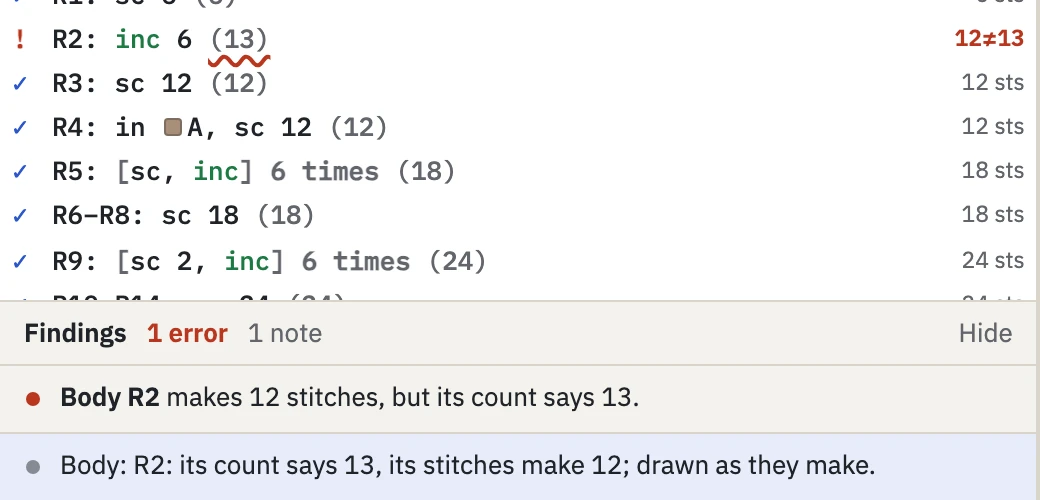
Repeat stitches and rounds
R5: [sc, inc] 6 times
R6: [sc 2, inc] around
R7-R9: sc 24- Square brackets hold the stitches to repeat.
6 timessays how often.aroundrepeats them to the end of the round. R7-R9works the same round three times.
To change one round of a range, put the cursor on its line and click Split. Each round gets its own line.

Add a round
Put the cursor on a round and click + Round, or press Ctrl + Enter (⌘ + Enter on a Mac). The new round goes under it. The rounds below are renumbered, and so is every assembly line that points at them.
If you type round numbers by hand and they fall out of order, the editor offers Renumber at the end of the line.
Add a part
Click + Part. Give the part a name, say how many to make and how it starts. The editor writes its first lines.
A part is its name with a colon, then lines that describe it:
| Line | What it says |
|---|---|
Ears (make 2): |
The name. (make 2) for two the same. |
Start: magic ring |
How the part begins. A chain is Start: ch 15. |
Colour: B |
The colour it starts in. |
Stuffing: firm |
firm, medium, light or none. |
End: gathered |
gathered, open or sewn. |
Worked in: rows |
Rows instead of rounds. |
You can also set the stuffing and the end on the toy itself, in Edit.
Change colour
Give each colour a short code on the Colours line. A part starts in its Colour. Write in A, at the start of a round to change colour from there on.
Field Mouse
Colours: A #A88F7A, B #F3E6CF

Body:
Colour: B
R1: sc 6
R2: inc 6
R3: sc 12
R4: in A, sc 12The colour button above the text edits a colour or adds a new one.
Insert stitches with a click
The buttons above the text put a stitch where your cursor is. More holds the rest of the stitches. Repeat wraps the stitches you have selected in a repeat.
While you type, the editor suggests what fits next. The ? button lists every stitch it reads.
Choose your crochet terms
The Terms menu at the top tells the editor which terms your rounds are written in: US, UK, DE, FR, ES, NL or UA.
If the pattern already has rounds, the menu asks what to do with them:
- Rewrite the rounds changes their stitch words to the new terms: from US to UK,
scbecomesdc. A round the editor does not read stays as it is. - Leave the rounds as written only changes how the editor reads them. Choose it when you pasted a pattern that is already in those terms.
Undo brings the old text back.
Leave a note
Any line that is not a round or a part line is kept as a note.
R16: [sc, invdec] 6 times
Stuff the body firmly before you close it.
R17: invdec 6More ways to write a round
| You write | It means |
|---|---|
[sc, (sc, dc, sc) in next st] 6 times |
Several stitches into one. |
3 sc in next |
Three stitches into one. |
sc3tog |
Three stitches worked together. |
[ch, skip, sc] 6 times |
Skip a stitch. |
sc 12 (back loops) |
Back loops only. Front loops: (front loops). |
sc 6, sc 6 in B |
Change colour part-way through a round. |
sc 12 in the unused back loops of R2 |
Work into loops left free in an earlier round. |
sc 6, (ch 4, in the 2nd ch from hook: sl st, sc, hdc), sc 6 |
A chain worked back along itself: a fin, a picot. |
Popcorn, bobble and puff stitches are drawn on the toy. Post stitches and loop stitch are counted, and drawn as plain stitches.